


1. USB Disk Security provides 100% protection against any threats via USB drive, however, the majority of other products are unable even to guarantee 90% protection.
2. USB Disk Security is the best antivirus software to permanently protect offline computer without the need for signature updates, but other antivirus software should update signature database regularly, and they cannot effectively protect offline computer.
3. This light and easy to use solution is 100% compatible with all software and doesn't slow down your computer at all.
4. You pay USB Disk Security once and get it all, however, other antivirus products should be paid for updates every year.
Download Here
2. Prevent Virus Spreading From USB Disk

My PC usually gets infected with viruses whenever I plugin any of my friends Pen Drive. Here is a simple tool known as iKill which prevents the spreading of viruses from Pen Drive to your PC.
It works by scanning the drives for the presence of removable drives. If found, it parses the autorun.inf file for the executables it may run. If AutoProtect is enabled,it will automatically delete the files present on the drive. Otherwise, it will prompt you for your permission to delete the virus. Version 2 includes unspecified updates.
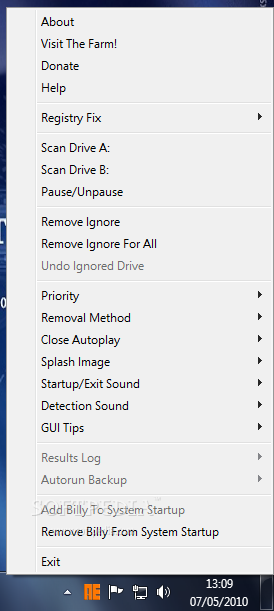 Autorun Eater was born due to increase of malwares using the 'autorun.inf' tactic to infect users unknowingly be it from flash drives, removable hard disks or any other removable storage device. When an infected device is infected with a malware and an 'autorun.inf' file is dropped, the shell menu is normally modified to execute the malware whenever the unsuspecting user double-clicks the infected drive.
Most anti-malware apps out there will almost instantly remove any malware detected but more often than not they leave the 'autorun.inf' file behind. And what if the anti-malware app fails to catch the malware? Here is when Autorun Eater comes in handy.
Autorun Eater will remove any suspicious 'autorun.inf' files even before the user attempts to access the drive. These files are auto-backup'ed in case of false positives.
Here are some key features of "Autorun Eater":
· Scan and remove suspicious Žautorun.infŽ files found in the root directory of all drives, C-Z, in real-time
· Scan priority(normal/high)
· Scan results are logged
· Add and remove from startup entry
· 3 optional registry fixes (Task Manager, Regedit & Folder options).
· Users are informed whenever a suspicious "autorun.inf" file is detected.
· Backup copies of suspicious "autorun.inf" file(s) are created before the original copy is removed for easy recovery.
· Status tooltip to get tool info easily without right-clicking on tray icon.
What's New in This Release:
· Added: 2 suspicious "autorun.inf" removal methods - "Ask For Confirmation" and "Auto-Remove".
· Added: Feature to view contents of suspicious 'autorun.inf' files in detection window.
· Added: Option to on or off startup/exit sound.
· Added: Option to on or off detection sound.
· Added: Option to enable or disable GUI Tips.
· Added: Option to ignore suspicious 'autorun.inf' files.
· Added: "Remove Ignore" option to undo previously ignored suspicious "autorun.inf" files.
· Changed: Detection window has evolved from a mundane message box to a cooler GUI window!
· Changed: Smaller memory footprint.
· Changed: Minor tweaks to the scanning engine.
· Changed: Minor tweaks to program behaviour.
· Changed: Minor improvements to installer.
· [Fixed]: Minor Scan Drive A: and B: issues.
Download Here



